

HousebetsHousebets
Hadiah MingguanHadiah bulanan——
Housebets

Kasino

  • Beranda Kasino
  • Slot
  • Kasino Langsung
  • Rilis Baru
  • Permainan Meja
  • Blackjack
  • Roulette
  • Baccarat

Olahraga

  • Taruhan Olahraga
  • Olahraga Langsung
  • Sepak Bola
  • Balap Kuda
  • Basket
  • Tenis
  • eSports
  • NFL
  • Hoki Es

Dukungan/Hukum

  • Ketentuan Layanan
  • Perjudian yang Bertanggung Jawab
  • Pengecualian diri
  • Penyelesaian sengketa
  • Anti Pencucian Uang
  • Keadilan dan Metode Pengujian RNG
  • Kebijakan KYC
  • Kebijakan Privasi
  • Akun, Pembayaran & Bonus
  • FAQ
  • Syarat dan ketentuan

Promo

  • Klub VIP
  • Promosi

Tentang kami

  • Mengapa Housebets

Hubungi kami

support@housebets.com

Komunitas kami

Housebets dioperasikan oleh Bridge Technologies B.V. (No. Reg. 160264(0)), Dr. M.J. Hugenholtzweg 25, Willemstad, Curaçao. Berlisensi oleh Curaçao Gaming Control Board (OGL/2024/431/0231). Pembayaran dapat diproses oleh Bridge Technologies (Cyprus) Limited (HE 440867), Aigyptou 12, Nicosia, Cyprus.

©2026 Housebets. Semua hak dilindungi.

Gamble Responsibly
Housebets

Hubungi kami

support@housebets.com

Komunitas kami

Housebets dioperasikan oleh Bridge Technologies B.V. (No. Reg. 160264(0)), Dr. M.J. Hugenholtzweg 25, Willemstad, Curaçao. Berlisensi oleh Curaçao Gaming Control Board (OGL/2024/431/0231). Pembayaran dapat diproses oleh Bridge Technologies (Cyprus) Limited (HE 440867), Aigyptou 12, Nicosia, Cyprus.
Gamble Responsibly

©2026 Housebets. Semua hak dilindungi.

  1. Semua Koleksi
  2. Account and Security
  3. How do I set up 2FA on my account?

How do I set up 2FA on my account?

Protect your account with Two-Factor Authentication (2FA). Learn how to enable it in just a few steps for added security.

Dukungan Housebets · Diperbarui 3 Mar 2026

Two-factor authentication (2FA) is a security approach in which a code is transmitted to a device linked to an account using authentication software like Authy or Google Authenticator. This code is then required anytime an action on the account is performed, such as logging in.

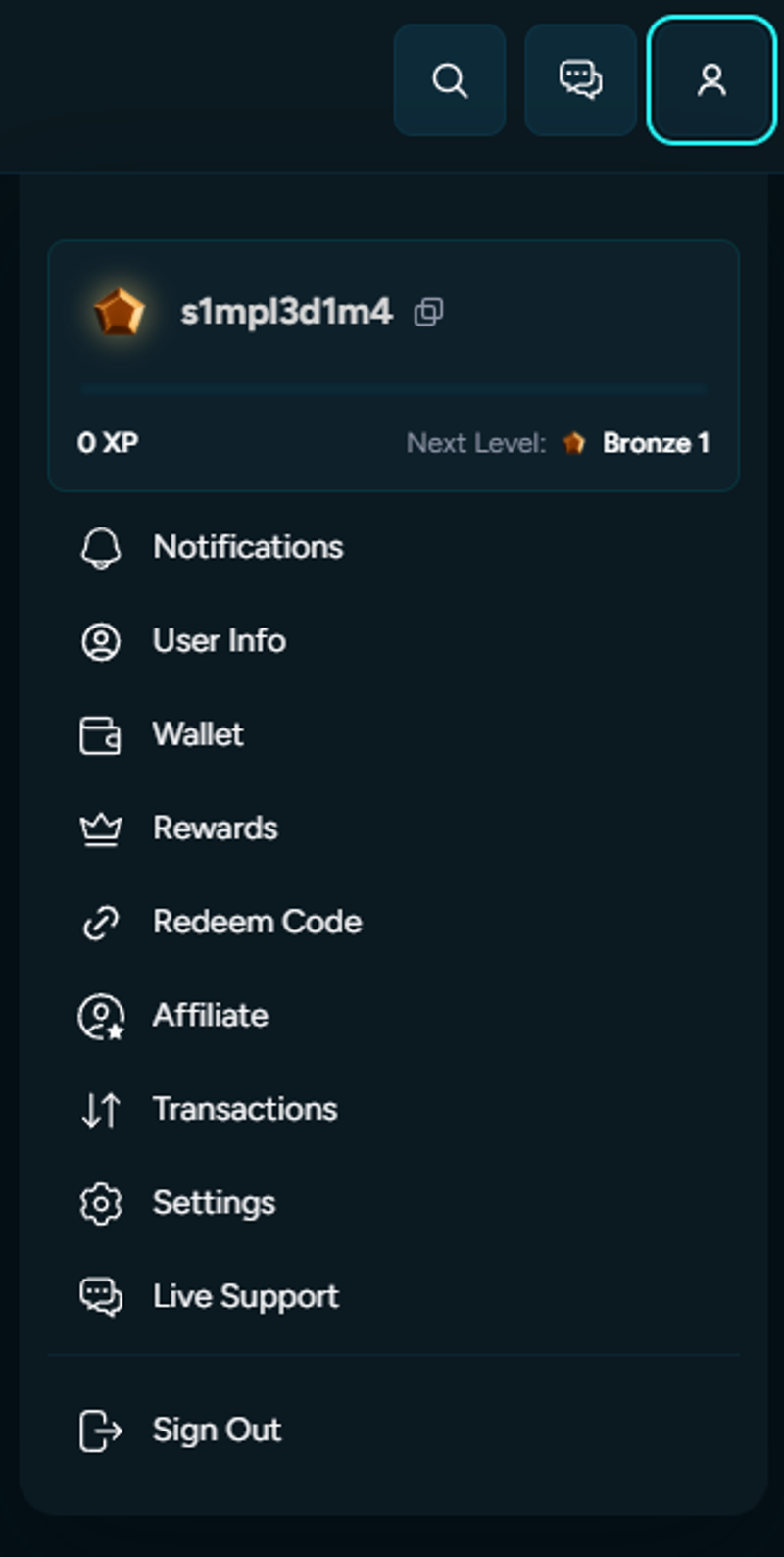
If you haven't already, we strongly advise you to use this technique to boost the security of your account significantly. Installing a 2FA app on your phone or computer is the first step; Next, go to the Housebets 2FA section under Profile.
https://downloads.intercomcdn.eu/i/o/g6xtrrnr/57038254/20a519c7458e259ec4734d2417a9/AD_4nXfUgHkohbScEWWWI3HdyJi6xiIZInhpCiUeMoCWGojPPHuWo32saX3UR8BcNmHvC34s674Wf9p2QHuthE-fSMVu_rVZA3FM10ShMeYxxt_3ocmvTBXng6VF8j4ymwGvBV8pz8FD?expires=1781092800&signature=d46af0de8f2a16e534812d48d938c998fa7e5ae2814b5557495f0bae82e76cf4&req=1dJvxlD4qTNk2hj99dpg6s04drHqss98P9%2FJ9MDJDDcuqeeM6iposJ6Wvbwb%0AraHGJuSKv%2F3hAoAfZJvVWN%2Bf%0A

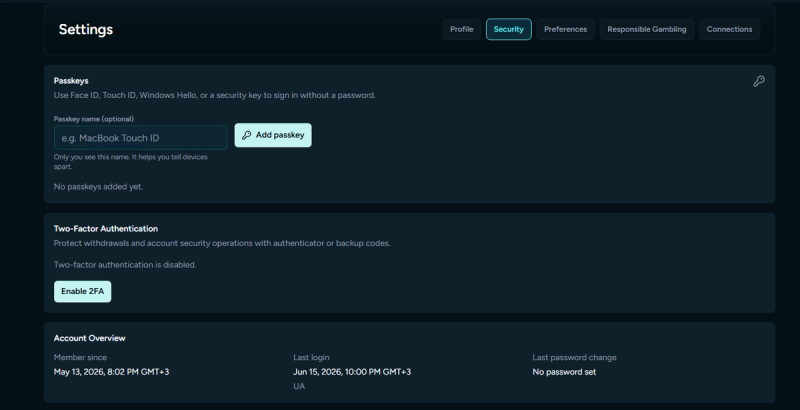
First, click Settings and then select Security.
https://downloads.intercomcdn.eu/i/o/g6xtrrnr/57038256/094b0cd39469213f1f8f64680037/AD_4nXfMj6fwRcLGTP4S-PJdT-NScpv7B64s2YtMFe_AG72R7R-UnE1QSzVBxlU8EE4rk3E3PfR9cIQZWOystL2DG9mVQ0w8oiFdDmvWhey_UvZwttqdYfjWU_1acQRSAi3L6ubz4PhmXw?expires=1781092800&signature=38041411781183e427efe1fc450f0e7b61024e33e8aeecff927dfc7515688eea&req=1dJvxlD4qTFk2hj99dpg6k6mdNgN%2Bea0d2wMgYPEKQN%2FJ0vO%2BJPtje1zzUnK%0ATDDlVGywQbbQjXPizqlpLON0%0A

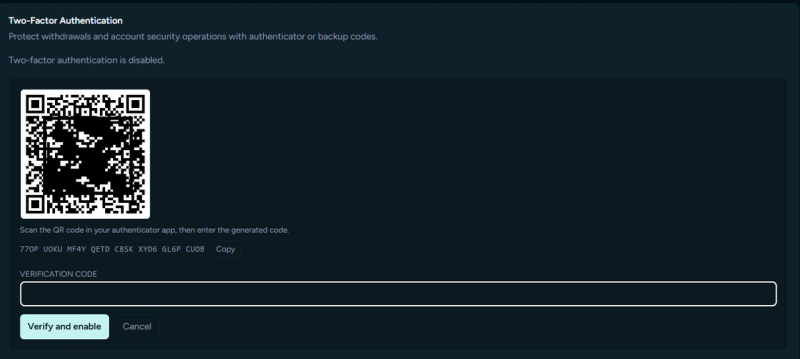
You may scan a QR code to link your Housebets account to the 2FA app you installed. You will also be given a secret Account Token (Key), which you should keep to yourself and never disclose because it can be used to turn off 2FA on your account.
https://downloads.intercomcdn.eu/i/o/g6xtrrnr/57598809/556c5e5bb5a6a966fa8da18d21fd/image+%2822%29.png?expires=1781092800&signature=58d0fe5fb53b2e11a330bee2e01a3639dbad3294a876c899cfa00c1c549211ad&req=1dJqzFDyrD5k2hj99dpg6sZO9nocDqIdn9ljU8fUbV920p89q1uic4Wvg%2Bo3%0AoNkF9m6Htd6z5zBW4q1NBv%2F%2F%0A

Please enter the code you see on the app under "Housebets - (Your Email)" after you have scanned the QR code.
​
2FA will be activated on your account when this is finished.
​
A 2FA code must be entered to log in, which adds an extra layer of protection to your account. The code will appear as follows: for security, a new one is created every 30 seconds in the app.

Artikel Terkait

Am I eligible to register?
Can I change the email on my account?
How do I change my username?